Turn searches
into customers.
Ask what to fix, write, or prioritize. TurboConsole researches your site and competitors, then helps you get the work done.
Connect Google Search Console. From $29/month after your trial.
How TurboConsole works
The whole picture.
One conversation.
Your search dataFind where you’re already getting seen.
Your actual pagesSee what to keep, fix, and improve.
Your competitorsUnderstand what’s winning in search.
 Less time in the weeds. More time building.
You have a business to run.
And about twelve other things to do today.
Bring TurboConsole the question. It brings together the search data, page research, and next step—so you can get back to the work that needs you.
Find my next moveGood answers
deserve to be found.
People ask questions in more places now. Start with pages that answer them clearly.
Our free AI visibility check looks at your page’s structure, sources, and answer-ready content. Bring what you learn back to TurboConsole.
Check a page for freeA page readiness check. Rankings and AI citations are not measured. ChatGPT
 Gemini
 Perplexity
The work matters.
So does what happens next.
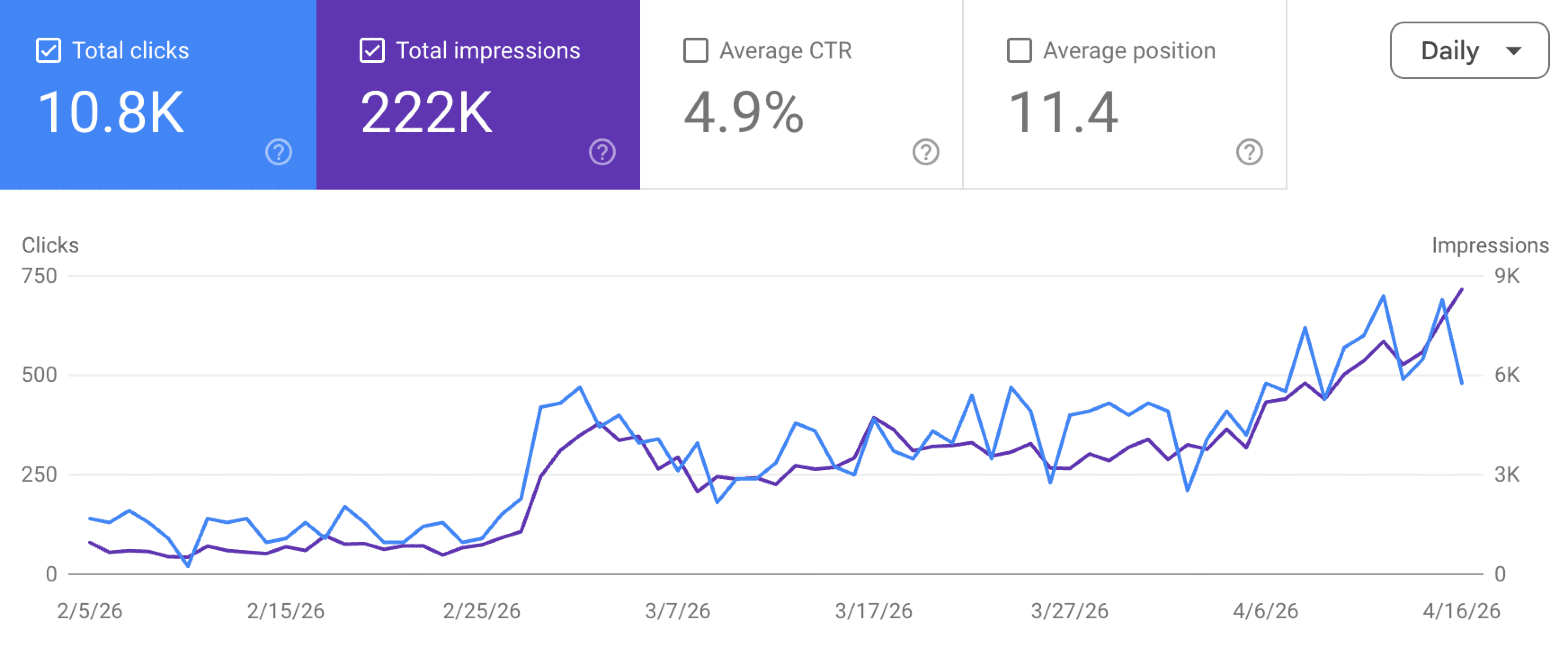
Check your Search Console performance as you publish improvements. Keep asking what changed, which pages drove it, and what to investigate next.
From the Search Console example shown
Put your search data to work
Start with the problem in front of you.
Work through the evidence, see what to check next, and bring the question into TurboConsole when you’re ready.
Find SEO quick wins
Prioritize existing pages using search evidence, business relevance, and the work required.
Read the guide →Diagnose a traffic drop
Separate a measurement issue, a change in search visibility, and a change in who clicks.
Read the guide →Check keyword cannibalization
Check whether pages serve the same intent before deciding to merge, redirect, or differentiate them.
Read the guide →Use Claude for SEO
Choose a worthwhile page, read what is there, and draft one specific improvement.
Read the guide →Answers before you connect
What does TurboConsole actually do?
Ask a question about your site. TurboConsole investigates your Search Console data, reads live pages, and checks relevant competitors. You get an answer with evidence and a specific next step. Save useful work to your plan and follow the results after you make a change.
Does TurboConsole change anything on my site?
You stay in control. Research plans prepare work for your website editor. The separate Concierge service adds reviewed content pull requests through a selected GitHub repository. You approve the exact change and control merging and deployment. TurboConsole then checks the live page.
How is this different from asking ChatGPT or Claude?
TurboConsole combines a persistent conversation for each site with Search Console, live page checks, keyword research, and competitor tools. You can investigate a finding, draft a change, save it to your action plan, and follow the results in the same product.
Can it replace Ahrefs or Semrush?
TurboConsole brings search data and research into a conversation and helps you decide what to do. Ahrefs and Semrush offer large research databases and dedicated analysis tools. Whether you need both depends on how much independent research you do.
Do I need SEO experience?
No. Start with a question such as ‘What should I work on next?’ or ‘Why did my traffic drop?’ TurboConsole explains what it finds in plain language and can prepare exact changes when the evidence supports them.
Is this another AI content tool?
You can ask TurboConsole to draft titles, descriptions, page improvements, and content briefs based on its research. It also investigates performance and helps prioritize work. You review the work before publication. Concierge adds a guarded GitHub delivery workflow for supported content files.
How do I know the recommendations are real?
Every recommendation carries its evidence: the query, the impressions, your position, and what TurboConsole found on your live page or in the SERPs. Estimates show their math. And a few weeks after you ship a change, TurboConsole re-checks your Search Console and reports the measured result — including when it's flat.
Do you charge credits or per message?
No. There are no credits, no per-message fees, and no overage bills. One flat monthly price covers all of TurboConsole's research and recommendations.
What does it cost?
Plans start at $29/mo (Solo, 1 site), $49 (Starter, 3 sites), $99 (Pro, 10 sites), and $199 (Agency, 25 sites). These research plans share the same features and start with 7 days free, no card. SEO Concierge is a separate $99/month service for one site, adding reviewed content delivery; see Pricing for availability and scope.
Can I manage multiple sites or clients?
Yes — paid plans run from 1 site (Solo) up to 25 (Agency). Every site you connect shows up in one overview so you can see at a glance which are gaining or losing traffic.
How long does setup take?
Connect Google Search Console and choose your site. Then ask your first question. Live research can take a few minutes; you can follow its progress as TurboConsole works. Your free week starts after TurboConsole saves your first connected answer.
What should you
work on next?
Bring your site. Let’s find out.
Just exploring? Try a free page check without signing in
Free · no sign-up · see what to fix in 60 seconds